How to Integrate CRM With Marketing Automation for Seamless Growth
Step-by-step guide to integrating your CRM with marketing automation tools to unify customer data, improve lead nurturing, and drive more revenue.
What Is CRM and Marketing Automation Integration?
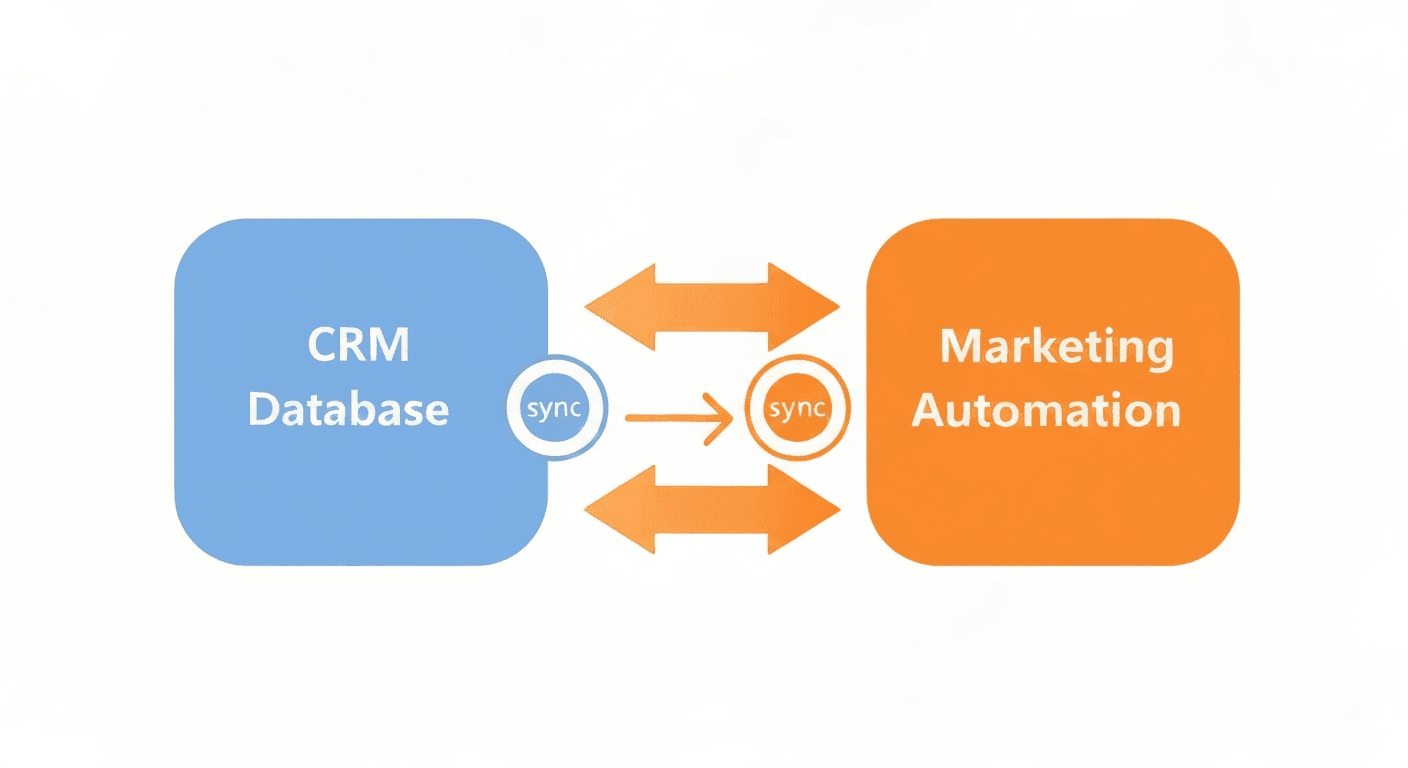
CRM and marketing automation integration is the process of connecting your customer relationship management system with your marketing automation platform so that data flows freely between the two. When these systems are linked, every interaction a prospect has with your marketing, from opening an email to downloading a whitepaper, is visible inside the CRM where your sales team works. Conversely, sales activity like calls, meetings, and deal stages flows back to marketing so they can tailor campaigns accordingly.
Without this integration, your organization operates with two disconnected views of the customer. Marketing sees email opens and ad clicks but has no idea which leads turned into revenue. Sales sees deals in the pipeline but cannot tell which campaign sourced them. This blind spot leads to wasted budget, duplicated effort, and frustrated customers who receive irrelevant messaging.
A proper integration eliminates these silos. It creates a single source of truth for every contact, lead, and customer in your database, enabling both teams to make better decisions with complete information.
Why Is Integrating CRM With Marketing Automation Important?
The benefits of integration extend far beyond convenience. Here is what connected systems deliver:
- Complete customer visibility. Every touchpoint, from first ad click to post-sale support ticket, lives in one unified record — including lead scoring signals. No more switching between platforms to piece together a customer's history.
- More effective lead nurturing. Marketing can trigger personalized email sequences based on CRM data like deal stage, product interest, or sales rep notes. A lead stuck in negotiation gets different content than one who just entered the funnel.
- Accurate attribution. When CRM revenue data connects to marketing campaign data, you can finally answer the question: "Which campaigns actually generate money?" This clarity drives smarter budget allocation.
- Shorter sales cycles. Sales reps armed with a lead's full engagement history can have more relevant conversations. They know which pages the prospect visited, which emails they opened, and which content they consumed.
- Reduced data entry. Automation eliminates the need for reps to manually log marketing interactions or for marketers to manually export lead lists. Data syncs happen in real time or on a scheduled basis.
- Better customer experience. When marketing and sales share the same data, customers stop receiving tone-deaf emails about a product they already purchased or a problem that was already resolved.
How Do You Plan a CRM and Marketing Automation Integration?
Before you connect any tools, invest time in planning. A rushed integration leads to messy data, broken workflows, and user frustration. Follow this framework.
Step 1: Audit Your Current Data
Start by understanding what data lives where. Map out:
- Contact fields in both systems (name, email, company, phone, etc.)
- Custom fields unique to each platform (lead source, product interest, subscription tier)
- Lifecycle stages and how they differ between marketing and sales definitions
- Data quality issues like duplicates, incomplete records, and outdated information
Clean your data before integrating. Syncing dirty data between two systems only multiplies the problem. Deduplicate contacts, standardize field formats (for example, consistent phone number formatting), and archive leads that have been inactive for more than 18 months.
Step 2: Define Your Data Model
Decide how data should flow between systems. Key questions to answer:
- Which system is the source of truth for each field? For example, the CRM might own deal stage and revenue data, while marketing automation owns email engagement and lead score.
- What triggers a sync? Should data update in real time, or is a batch sync every 15 minutes acceptable?
- Which direction does data flow? Some fields should sync bidirectionally (like contact information), while others should only flow one way (like marketing email metrics going to the CRM but not back).
- How do you handle conflicts? If a sales rep updates a phone number in the CRM and the contact updates it on a marketing form simultaneously, which value wins?
Document these decisions in a shared integration spec that both teams review and approve.
Step 3: Choose Your Integration Method
There are three common approaches to connecting CRM and marketing automation platforms:
Native integrations are built-in connectors provided by the software vendors. For example, HubSpot's CRM and marketing hub are natively connected, and Salesforce offers tight integrations with Pardot and Marketing Cloud. Native integrations are the easiest to set up and maintain but may lack flexibility for complex requirements.
Third-party integration platforms like Zapier, Make (formerly Integromat), or Workato act as middleware between your systems. They offer pre-built connectors and visual workflow builders that let you map fields, set triggers, and define sync logic without writing code. These are ideal for connecting platforms from different vendors.
Custom API integrations involve building direct connections using each platform's API. This approach offers maximum flexibility and control but requires developer resources and ongoing maintenance. Reserve this for situations where native and third-party options cannot meet your requirements.
Step 4: Map Your Fields
Create a detailed field mapping document that specifies:
| Marketing Automation Field | CRM Field | Sync Direction | Source of Truth |
|---|---|---|---|
| Email Address | Bidirectional | Most recent update | |
| Lead Score | Lead Score (custom) | Marketing to CRM | Marketing automation |
| Lifecycle Stage | Lead Status | Bidirectional | CRM |
| Last Email Open Date | Last Marketing Activity | Marketing to CRM | Marketing automation |
| Deal Amount | N/A | CRM only | CRM |
This mapping ensures that every piece of data has a clear home and a defined sync behavior.
What Are the Most Common Integration Scenarios?
While every business is different, most CRM and marketing automation integrations support these core workflows:
Lead Handoff From Marketing to Sales
When a lead reaches a predefined score or takes a high-intent action (like requesting a demo), the marketing automation platform updates the lead's status and pushes them into the CRM with all accumulated data. The CRM then assigns the lead to a sales rep based on routing rules and triggers a notification.
Key fields to sync: lead score, source campaign, content engagement history, form submission data, and qualification criteria.
Sales Activity Feeding Marketing Campaigns
When a sales rep marks a deal as "closed-lost" with a reason of "timing," the CRM pushes that data back to marketing automation. Marketing then enrolls the contact in a long-term nurture campaign designed to re-engage them in six months. Without integration, that lost deal vanishes into a CRM graveyard with no follow-up.
Key fields to sync: deal stage, close reason, next follow-up date, and product interest.
Customer Onboarding Automation
After a deal closes in the CRM, the integration triggers a marketing automation workflow that sends a welcome email series, schedules onboarding resources, and tracks product adoption signals. This ensures new customers receive a consistent experience regardless of which rep closed the deal.
Re-Engagement Campaigns
By syncing CRM data on customer activity (or inactivity) back to marketing automation, you can automatically trigger win-back campaigns for customers who have not logged in, made a purchase, or engaged with support in a defined period.
How Do You Avoid Common Integration Pitfalls?
Integration projects fail more often from poor planning than from technical issues. Avoid these common mistakes:
- Syncing everything. Not every field needs to flow between systems. Syncing unnecessary data creates noise and increases the chance of conflicts. Only sync fields that both teams actually use.
- Skipping the data cleanup. Integrating systems with duplicate contacts, invalid emails, and inconsistent formatting just spreads the mess. Clean first, connect second.
- Ignoring sync frequency. Real-time sync sounds appealing but can strain API rate limits and cause performance issues. Evaluate whether near-real-time (every 5-15 minutes) is sufficient for your use case.
- Lack of error handling. What happens when a sync fails? Build in logging, alerts, and retry logic so you catch problems before they cascade.
- No documentation. When the person who built the integration leaves, will anyone understand how it works? Document every workflow, field mapping, and sync rule.
- Forgetting about permissions. Ensure that integration users or service accounts have appropriate permissions in both systems but are not over-provisioned with admin access they do not need.
How Do You Test a CRM and Marketing Automation Integration?
Thorough testing prevents embarrassing failures in production. Follow this testing checklist:
- Create test contacts in both systems and verify they sync correctly with all mapped fields intact.
- Test lifecycle stage transitions. Move a test lead from MQL to SQL in marketing automation and confirm the CRM reflects the change.
- Trigger automated workflows. Submit a test form, hit the lead score threshold, and verify that the full handoff sequence fires correctly.
- Test conflict resolution. Update the same field in both systems simultaneously and confirm the source-of-truth rules are enforced.
- Validate reporting. Run attribution reports to ensure campaign data flows correctly from marketing to CRM revenue records.
- Load test at scale. If you process thousands of leads monthly, test the integration with a realistic volume to catch rate-limiting or performance issues.
- Check error notifications. Intentionally break a sync (for example, by changing a required field) and confirm that your monitoring alerts fire as expected.
How Do You Measure Integration Success?
After launch, track these metrics to confirm the integration is delivering value:
- Data accuracy rate: Spot-check records monthly. What percentage of synced contacts have complete, accurate data in both systems?
- Sync error rate: How many records fail to sync each day? This number should trend toward zero over time.
- Lead response time: How quickly do sales reps follow up after a lead is handed off? Integration should reduce this from hours to minutes.
- Marketing-sourced pipeline: What percentage of sales pipeline originated from marketing campaigns? Accurate attribution depends on clean integration.
- Campaign ROI accuracy: Can you confidently report revenue per campaign? If not, your integration has gaps.
What Should You Do After the Integration Is Live?
Integration is not a one-time project. Treat it as an ongoing capability that evolves with your business:
- Review field mappings quarterly. As your product, sales process, or marketing strategy evolves, your data model needs to keep up.
- Monitor API usage. Stay within rate limits and optimize sync frequency if you approach thresholds.
- Train new team members. Every new marketing or sales hire should understand how the integration works and how their actions in one system affect the other.
- Iterate on workflows. Use the connected data to build increasingly sophisticated automation, from predictive lead scoring to dynamic content personalization based on CRM deal stage.
A well-executed CRM and marketing automation workflow integration is one of the highest-leverage investments a growing business can make. It aligns your teams, eliminates data silos, and creates the foundation for scalable, data-driven growth. Start with a clean data audit, plan your field mappings carefully, and commit to ongoing maintenance. The payoff in efficiency, revenue, and team alignment will compound over time.
Harry Harrison
Founder & Editor, Easy Automation
Tech-forward B2B writer and content strategist focused on marketing and finance automation.