Automated Invoicing: A Complete Guide to Streamlining Your Billing Process
Learn how automated invoicing eliminates manual billing errors, accelerates cash flow, and saves small businesses hours every week with proven strategies.
What Is Automated Invoicing?
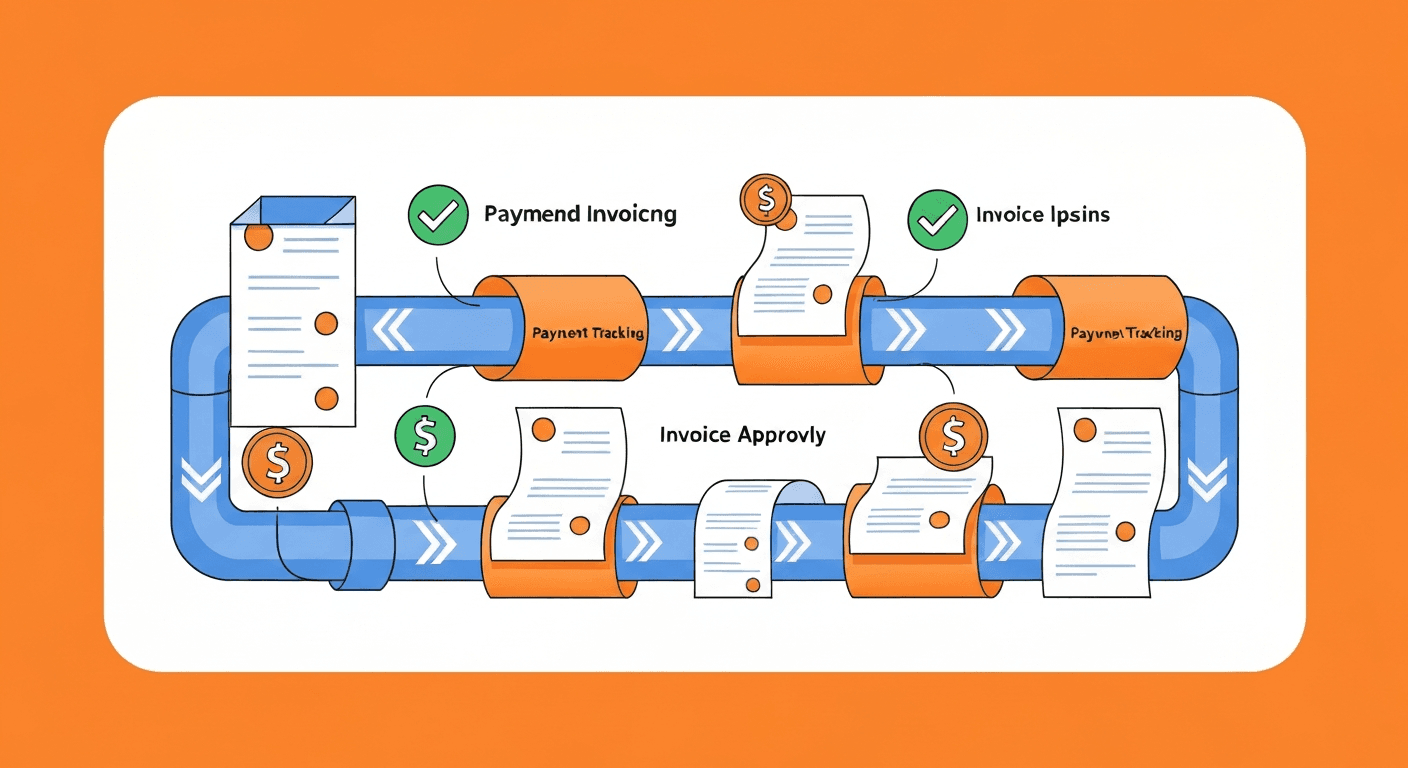
Automated invoicing is the use of software to generate, send, track, and follow up on invoices without manual intervention. Instead of opening a Word template, filling in line items by hand, exporting a PDF, attaching it to an email, and then logging the outstanding balance in a spreadsheet, an automated system handles every step based on predefined rules and triggers.
A typical automated invoicing workflow looks like this: a sale is completed or a service milestone is reached, the system automatically generates an invoice populated with the correct client details, line items, tax calculations, and payment terms, then delivers it to the customer via email or a client portal, tracks whether it has been opened, sends payment reminders on a schedule, records the payment when received, and updates your accounting ledger in real time.
For small business owners and freelancers who send dozens or hundreds of invoices every month, this shift from manual to automated billing is not a luxury. It is a fundamental improvement in how cash enters the business.
Why Should You Automate Your Invoicing Process?
Manual invoicing is one of the most common bottlenecks in small business cash flow. The problems compound quickly:
- Delayed invoices mean delayed payments. If it takes you three days after completing a project to sit down and create the invoice, you have already pushed your payment timeline back by three days before the client even receives it.
- Human errors damage credibility. Typos in amounts, incorrect tax calculations, wrong client addresses, and missing purchase order numbers all create friction. Each error requires a correction cycle that delays payment further and makes your business look disorganized.
- Follow-up falls through the cracks. Without a system tracking which invoices are outstanding and overdue, it is easy to lose track of unpaid bills. Many small businesses have thousands of dollars in receivables they are not actively pursuing simply because no one is monitoring the aging.
- Time spent billing is time not spent earning. Every hour you spend creating invoices, chasing payments, and reconciling records is an hour you are not spending on client work, sales, or strategic planning.
- Inconsistent branding and formatting. When invoices are created manually, formatting varies from one to the next. Professional, consistent invoicing builds trust with clients and reduces confusion.
Research from Fundbox found that 64% of small businesses deal with late-paying invoices, and the average small business in the United States is owed $84,000 in unpaid invoices at any given time. Automated invoicing does not guarantee every client pays on time, but it eliminates the internal delays and follow-up gaps that make the problem worse.
How Does Automated Invoicing Work?
Modern invoicing automation platforms operate on a few core principles that work together to remove manual steps from the billing cycle.
Invoice Generation
The system creates invoices based on triggers you define. These triggers can include:
- Time-based triggers. A recurring invoice is generated on the first of every month for retainer clients or subscription services.
- Event-based triggers. An invoice is created when a project status changes to "completed" in your project management tool or when a sales order is marked as fulfilled.
- Manual trigger with auto-population. You initiate the invoice, but the system pulls in the client name, address, line items, rates, and tax calculations from your contacts database and product catalog so you only need to review and send.
Delivery and Tracking
Once generated, the invoice is delivered through the channel the client prefers, whether that is email, a self-service client portal, or even integrated directly into their own accounts payable system. The platform tracks delivery confirmation, open rates, and click-through to the payment link. This visibility is critical because it removes the ambiguity of "I never received the invoice" as an excuse for late payment.
Payment Reminders
The system sends automated payment reminders on a schedule you configure. A common approach is:
- A friendly reminder 3 days before the due date
- A notice on the due date itself
- A follow-up 7 days after the due date
- An escalation notice at 14 and 30 days overdue
Each reminder can be customized in tone, from a gentle nudge to a firm request, and the sequence stops automatically once payment is received.
Payment Processing and Reconciliation
When the client pays through the invoice's embedded payment link (via credit card, ACH, or bank transfer), the system automatically marks the invoice as paid, records the transaction, matches it to the corresponding receivable, and updates your general ledger. No manual data entry, no reconciliation spreadsheet, no delayed books.
What Are the Best Automated Invoicing Tools?
The market for invoicing software is crowded, but several platforms stand out for small and mid-size businesses based on features, pricing, and integration capabilities.
For Freelancers and Solo Businesses
- FreshBooks. Excellent for service-based freelancers and consultants. Time tracking integrates directly with invoicing, so billable hours automatically populate invoices. Recurring invoices, automated reminders, and online payment acceptance are all built in. Plans start around $17 per month.
- Wave. A free invoicing and accounting platform that is surprisingly capable. It includes recurring invoices, automatic payment reminders, and the ability to accept online payments (for a processing fee). Best for very small businesses that need solid invoicing without a monthly subscription.
- HoneyBook. Designed for creative professionals, HoneyBook combines proposals, contracts, invoices, and payments in one workflow. When a client signs a contract, the invoice schedule is triggered automatically.
For Growing Small Businesses
- QuickBooks Online. The most widely used small business accounting platform in the United States. Its invoicing features include batch invoicing, recurring schedules, automatic reminders, built-in payment processing, and deep integration with the rest of the QuickBooks accounting ecosystem. Plans start around $30 per month.
- Xero. A strong QuickBooks alternative with particularly good multi-currency invoicing for businesses with international clients. Xero's invoicing includes recurring templates, automated reminders, and a client portal where customers can view and pay all outstanding invoices.
- Zoho Invoice. Part of the broader Zoho ecosystem, this platform offers robust invoicing with workflow automation, client portals, and integration with Zoho CRM, Zoho Books, and Zoho Projects. The free tier supports up to 1,000 invoices per year.
For Mid-Size Businesses
- Bill.com (now BILL). Handles both accounts receivable and accounts payable automation in a single platform. Its AR features include customizable invoice templates, automated dunning sequences, and ACH and credit card payment processing.
- Sage Intacct. An enterprise-grade solution that automates complex invoicing scenarios including milestone billing, usage-based billing, and multi-entity consolidated invoicing. Best for businesses that have outgrown basic small business tools.
How Do You Set Up Automated Invoicing Step by Step?
Transitioning from manual to automated invoicing does not need to happen all at once. Here is a practical implementation roadmap.
Step 1: Audit Your Current Invoicing Process
Before automating, document your existing workflow. Answer these questions:
- How many invoices do you send per month?
- What triggers an invoice (project completion, time period, product shipment)?
- What are your standard payment terms (Net 15, Net 30, due on receipt)?
- How do clients currently pay you (check, ACH, credit card, wire)?
- Who is responsible for creating invoices, and how long does it take?
- What is your current average days sales outstanding (DSO)?
This baseline gives you a clear picture of where automation will have the most impact and provides metrics to measure improvement.
Step 2: Choose Your Platform
Select invoicing software based on your volume, complexity, budget, and existing tool stack. If you already use QuickBooks for accounting, its built-in invoicing features may be the simplest path. If you need deeper customization or integration with CRM and project management tools, evaluate dedicated invoicing platforms.
Step 3: Configure Your Invoice Templates
Set up branded invoice templates with your logo, company information, payment terms, accepted payment methods, and any standard legal language. Most platforms allow you to create multiple templates for different client types or service categories.
Step 4: Import Your Client Data
Migrate your client database into the invoicing platform, including company names, billing contacts, email addresses, payment preferences, and any client-specific pricing or terms. Clean this data before importing; automation amplifies both accuracy and inaccuracy.
Step 5: Set Up Recurring Invoices and Triggers
For retainer clients and subscription services, configure recurring invoices with the correct amounts, frequencies, and start dates. For project-based work, set up event triggers that connect to your project management or sales pipeline tools.
Step 6: Configure Payment Reminders
Design your reminder sequence. Start conservatively with gentle, professional language. You can always adjust the timing and tone based on results. Make sure the reminders include a direct payment link to minimize friction.
Step 7: Test Before Going Live
Send test invoices to yourself and a few trusted clients before rolling out automation across your entire client base. Verify that amounts, tax calculations, payment links, and reminder sequences all work correctly.
How Does Automated Invoicing Improve Cash Flow?
The connection between invoicing automation and cash flow improvement is direct and measurable.
Faster invoice delivery means the payment clock starts sooner. When invoices go out the same day a project is completed or a product ships, you eliminate the internal delay that plagues manual processes.
Easier payment methods reduce friction. When a client can click a link in the invoice and pay by credit card or ACH in under a minute, they are far more likely to pay immediately than if they have to write a check, find an envelope, and mail it.
Consistent follow-up means fewer invoices slip through the cracks. Automated reminders are relentless in a way that humans are not. They do not forget, they do not feel awkward about asking for money, and they do not get busy with other tasks.
Real-time visibility allows proactive cash management. When you can see at a glance that $50,000 in invoices are due this week and $30,000 are overdue, you can make informed decisions about upcoming expenses, credit line usage, and vendor payments.
Businesses that implement invoicing automation typically see their average DSO decrease by 10 to 14 days within the first quarter, which can have a transformative impact on working capital, especially for businesses operating on thin margins.
What Are Common Mistakes to Avoid With Invoice Automation?
Automation solves many problems, but poor implementation creates new ones. Watch out for these pitfalls:
- Not customizing reminder language for different client types. A Fortune 500 procurement department and a small local business should not receive the same reminder email. Segment your clients and tailor your communication.
- Over-automating without human oversight. Automation should handle the routine; humans should handle the exceptions. Set up alerts for unusually large invoices, disputed amounts, and VIP clients so a real person can intervene when appropriate.
- Ignoring mobile optimization. More than half of business emails are opened on mobile devices. If your invoices and payment links are not mobile-friendly, you are adding unnecessary friction.
- Failing to integrate with accounting. If your invoicing platform does not sync with your general ledger, you are just moving the manual work from invoice creation to data entry. Ensure end-to-end integration so payments automatically update your books. This same principle applies to automated expense tracking and every other finance workflow.
- Setting it and forgetting it. Review your automation rules, templates, and reminder sequences quarterly. As your business evolves, your invoicing processes should evolve with it.
How Does Invoice Automation Connect to Your Broader Finance Stack?
Automated invoicing delivers the most value when it is connected to the rest of your financial technology ecosystem. Key integrations include:
- Accounting software for automatic revenue recognition and ledger updates
- CRM platforms for linking invoices to specific deals, clients, and sales representatives
- Project management tools for triggering invoices based on milestone completion
- Payment gateways for accepting multiple payment methods with automatic reconciliation
- Expense management systems for a complete picture of money flowing in and out of the business
- Tax preparation tools for ensuring invoiced revenue feeds directly into tax compliance workflows
When these systems are connected, you move from isolated automation to an integrated financial operation where data flows seamlessly between billing, accounting, reporting, and compliance without manual handoffs.
Is Automated Invoicing Worth It for Your Business?
If you send more than 10 invoices per month, the answer is almost certainly yes. The time savings alone justify the cost of most invoicing platforms, and the cash flow improvements from faster delivery, easier payment, and consistent follow-up typically deliver a return on investment within the first month.
For businesses sending 50 or more invoices monthly, automation is not optional. It is a prerequisite for maintaining accurate books, healthy cash flow, and professional client relationships at scale.
Start by automating your most repetitive invoicing tasks, such as recurring invoices and payment reminders, then expand to event-triggered invoicing and full accounting integration as you gain confidence in the system. The goal is not perfection on day one but a steady progression from manual chaos to automated clarity.
Frequently asked questions
Harry Harrison
Founder & Editor, Easy Automation
Tech-forward B2B writer and content strategist focused on marketing and finance automation.